Event Operations
Mid-Year 2026 Product Update: TicketLeap Features You’ve Asked For
We’re always listening. Every piece of feedback you share, support ticket you submit, and email conversation you have with our team helps shape what we build next. That’s why we’re excited to share a roundup of the new features and improvements so far in 2026. From a smarter dashboard to more flexible reporting options, these updates are designed to save you time, surface better insights, and make your events even easier to manage.
Here’s what’s new:
- Organization dashboard for a real-time view of sales and buyer data
- Cart Mode for multi-event purchases in a single checkout
- New and improved reports to make sense of your sales at a glance
- Event taglines to instantly communicate what makes your event special
- Additional small updates to improve your experience on TicketLeap
Organization dashboard
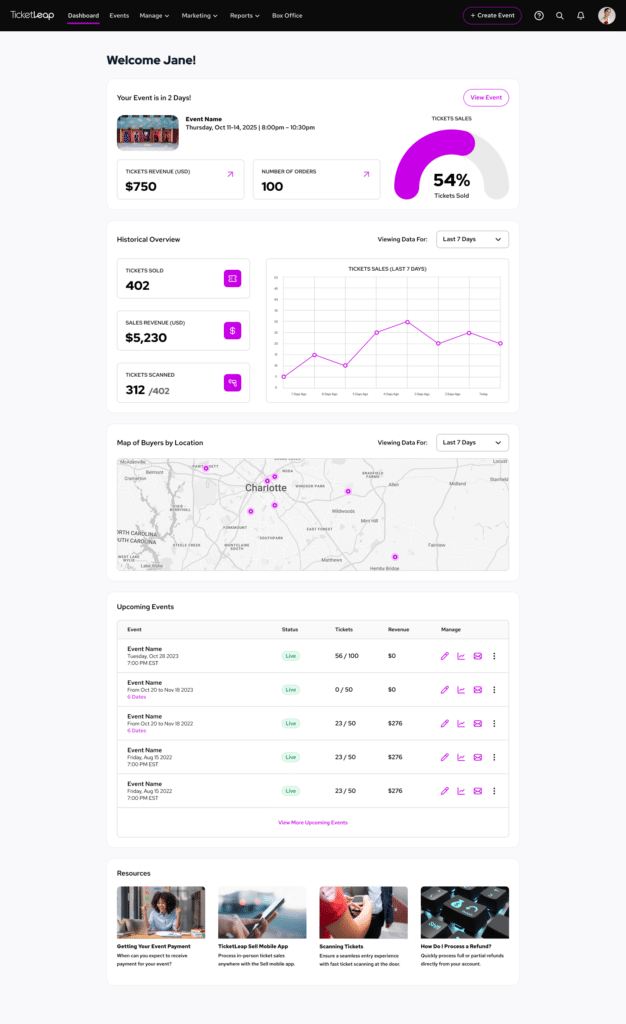
Having the right information at the right time is key to running your events well. Our new organization dashboard puts everything you need front and center, so you know how your events are performing at a glance.
Available to account owners and admins, the dashboard gives you a clear, visual snapshot of your most important data. You can see ticket sales, the percentage of tickets sold for your next upcoming event, as well as historical sales and revenue trends across the past 7, 30, or 90 days. You can view a map showing where your ticket buyers are located too. Your upcoming and active events are also right there, so you always know what’s on the horizon.
Whether you’re reviewing how last weekend went or gearing up for your next big event, the Organization Dashboard gives you a centralized view of the metrics that matter most!
Cart mode
If you run classes, workshop series, or multi-day events, you need it to be as easy as possible at checkout for attendees to purchase tickets to more than one session. Our “Cart Mode” feature changes that entirely.
Cart Mode is especially powerful for organizers who offer recurring or multi-day programming. With Cart Mode enabled, your attendees can add tickets to multiple events and complete a single purchase at checkout. No need to go through the entire checkout process separately for each event. The result? A smoother buying experience for your audience and more completed purchases for you.
Lots of new and updated reports
Data is a key ingredient to successful event planning. This update brings a significant upgrade to your reporting suite, with both revamped and brand-new reports designed to help you find the numbers you need, faster.
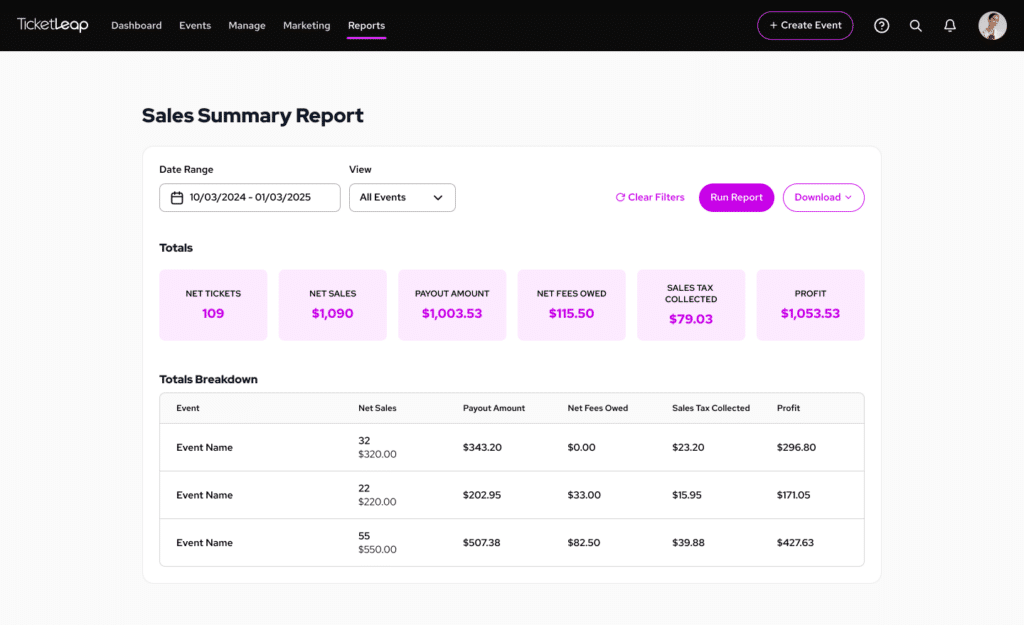
Sales summary report (new!)
Get a quick, high-level look at your event revenue across multiple events! This is ideal for comparing how events performed overall or reporting key numbers to stakeholders without getting into the weeds.
Sales detail report (updated)
This report has been updated to give you a deeper per-event financial breakdown, perfect for reconciling your finances after an event or understanding how each ticket type performed. It breaks down net sales, fees, cash and check sales, payout amounts, and sales tax in a single view.
Attendee report (updated)
This now has an even cleaner, easier-to-read layout! The check-in action has been removed from the report view to reduce clutter, and you can now access it directly by clicking Attendees Report from either the Reports navigation or the Quick Reports icon next to any event. A PDF download option has also been added, making it easy to print or share your attendee list.
Event taglines
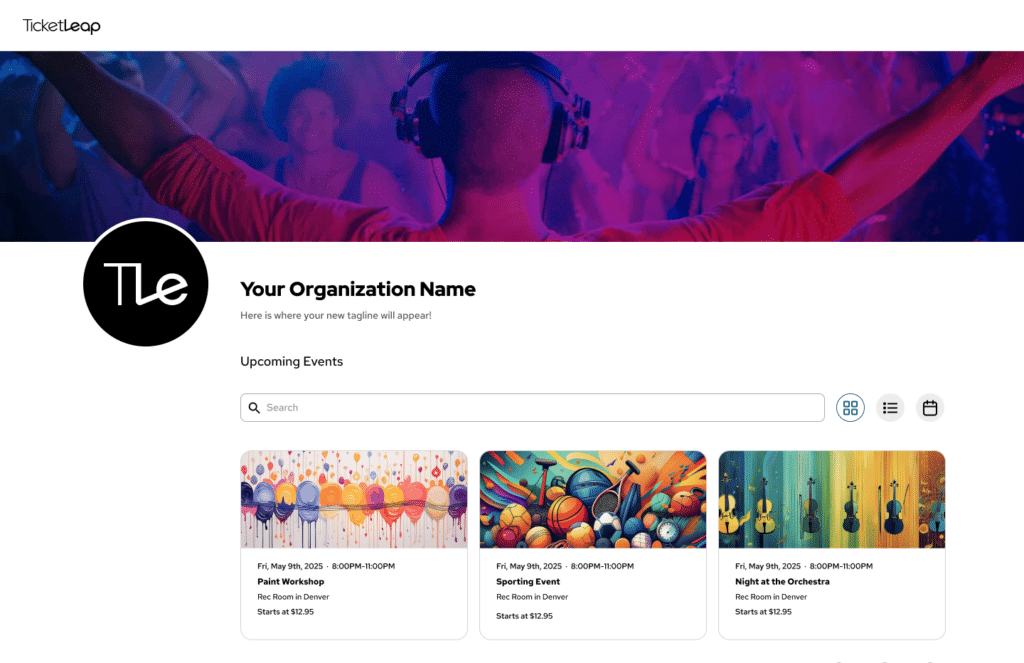
Event taglines let you add a short line of text (up to 101 characters) on your organization listing page to instantly capture what your event is all about. This feature is especially valuable for organizers who use their TicketLeap page as their primary event website, where that first impression needs to do the heavy lifting!
Think of it as your elevator pitch: a concise, punchy line that speaks directly to your audience and sets the tone before they click into an event and read a single word of your event description.
Additional updates worth knowing about
We’ve also been working on a handful of improvements that make the everyday experience of managing events on TicketLeap smoother and more polished.
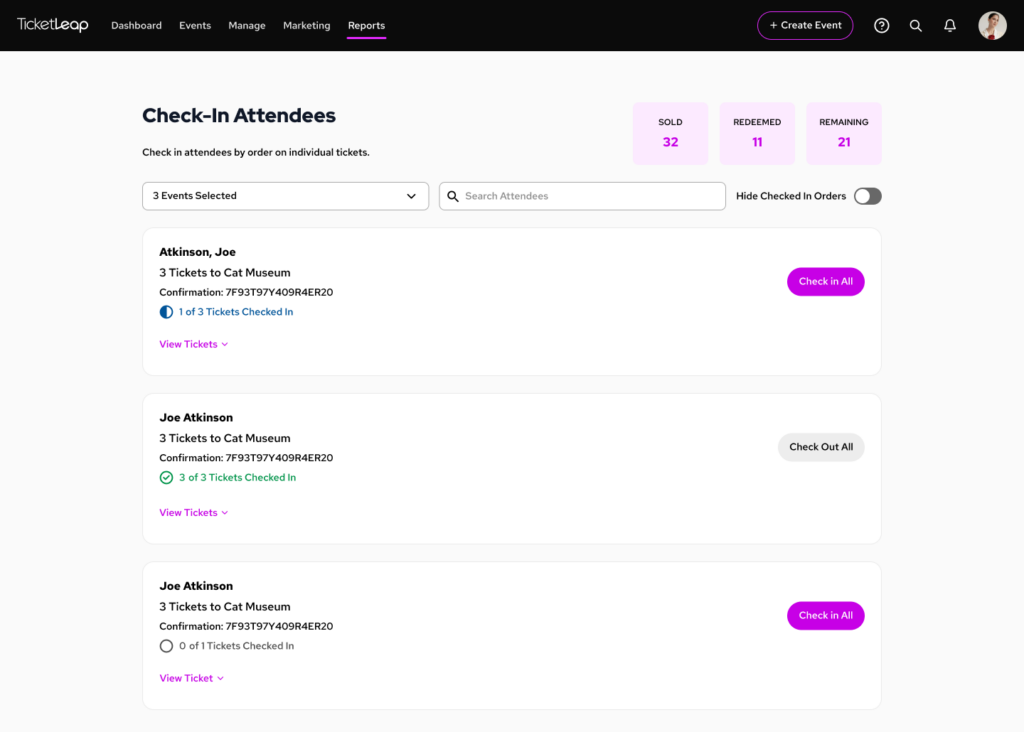
Check-in page
This page offers you flexibility to check in attendees manually from a web browser without needing the TicketLeap Scan app. You’ll find it under Box Office in the main navigation. It’s a great option for smaller events or situations where you need a quick, device-agnostic way to manage entry.
Revamped crop tool
Uploading your header image just got a whole lot easier! The updated crop tool is more responsive and gives you more precise control over how your image looks and gets it just right.
Reserved seating improvements
If your events use reserved seating, you’ll notice some meaningful upgrades!
- Event organizers can now allow buyers to leave single, unoccupied seats in a row when purchasing, giving you more flexibility over how your venue fills up
- You can view booth details, apply or remove holds, and update booth availability directly from the seating chart. This simplifies space management without needing to navigate multiple menus.
- When setting up a reserved seating event, you can now decide whether buyers must use Best Available seating, must choose their own seat, or have the option to do either. To configure this, simply head to the “Seat Settings” page under “Manage Event”.
Automatic calendar display
Your event’s calendar and ticket list now appear automatically on the ticketing page rather than requiring buyers to click the “Buy Now” button just to see available dates. This helps maximize your conversion rate at checkout by minimizing the total number of clicks to purchase and helps buyers quickly find the date that works for them.
What’s New tab
Stay in the loop on the latest TicketLeap product improvements straight from our platform! You can now receive regular product updates on major features directly within your TicketLeap account through the new What’s New tab.
What’s coming up next?
This is only the beginning! Here’s a sneak peek at what’s on the horizon for TicketLeap:
Zapier integration (coming soon!)
Save tons of time building your email list with our Zapier integration! Say goodbye to manually uploading buyer information to Mailchimp and other third-party platforms, and instead automate those workflows. That way, your attendee data stays up to date in third-party platforms without any extra effort on your end.
Auto queue-it (coming this fall!)
For high-demand events that can bring traffic spikes, Auto Queue-It will automatically detect surges in ticket sale traffic and route buyers into a queue. Once traffic levels return to normal, the queue automatically disables itself. That way, you’ll have peace of mind knowing your high-traffic onsales will be handled smoothly and automatically.
Built with feedback from event organizers like you
This mid-year update is a direct reflection of what you’ve been asking for, and we’re genuinely excited to see how these features help you put on better events. As always, your feedback is what drives us forward.
If you have ideas, questions, or run into anything along the way, don’t hesitate to reach out to our support team at [email protected]. We’re here for you, and we can’t wait to see what you create next on TicketLeap!

Super Easy Ticketing for Events

Stay Ahead With Our Latest Event Articles Delivered Straight to Your Inbox
Subscribe today to elevate your event planning game!
Receive exclusive insider tips on how to:
- Plan a successful event
- Maximize your ticket sales
- Optimize your marketing campaigns
- Ensure your event day runs smoothly